

فلاشة .Nokia 220DS_ rm-969_10.03.11_ar

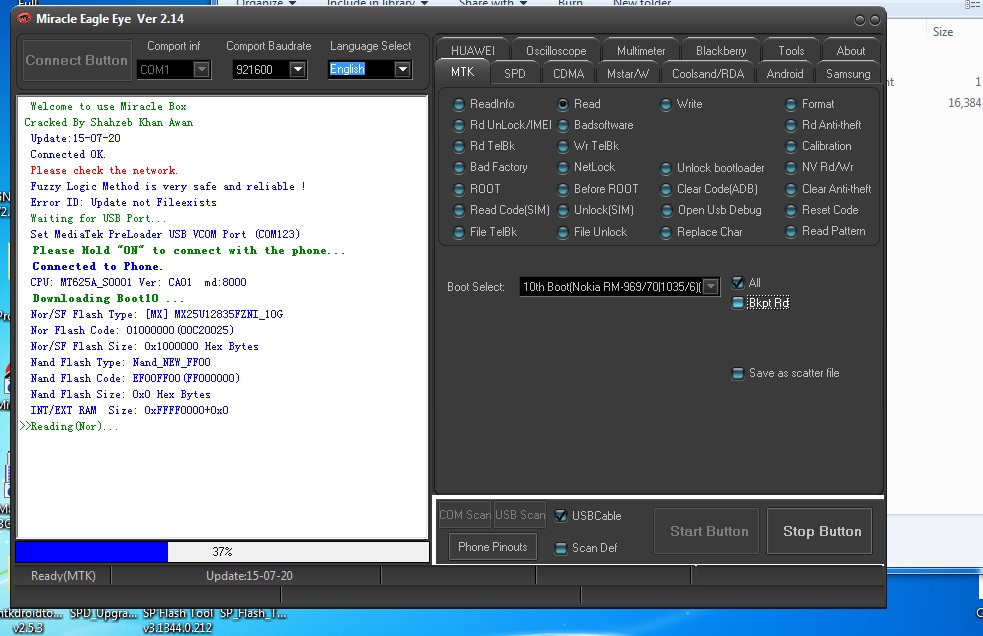
Set MediaTek PreLoader USB VCOM Port (COM123)
Please Hold "ON" to connect with the phone... Connected to Phone. CPU: MT625A_S0001 Ver: CA01 md:8000 Downloading Boot10 ... Nor/SF Flash Type: [MX] MX25U12835FZNI_10G Nor Flash Code: 01000000(00C20025) Nor/SF Flash Size: 0x1000000 Hex Bytes Nand Flash Type: Nand_NEW_FF00 Nand Flash Code: EF00FF00(FF000000) Nand Flash Size: 0x0 Hex Bytes INT/EXT RAM Size: 0xFFFF0000+0x0 Reading(Nor)... Read OK.
Link :Download
فلاشة .Nokia 220DS_ rm-969
فلاشة .Nokia 220DS_ rm-969_10.03.11_ar Set MediaTek PreLoader USB VCOM Port (COM123) Please Hold "ON" to conne...
- Libellés : دروس وشروحات فيديو
-

flash KIOWA B1 SC6531
 |
how to flash KIOWA B1
flash the phon vai miraclebox or another chinese Box crack
choose SPRD mode: SC6531: REV:0000:NOR
Download Mode (keyboot) *0# Keys
den
Download link
password extract: http://tasmimate.blogspot.com
Guide to flash KIOWA B1 SC6531 Tested Firmware and Nvram تفليش
flash KIOWA B1 SC6531 how to flash KIOWA B1 flash the phon vai miraclebox or another chinese Box crack choose SPRD mode: SC653...
- Libellés : دروس وشروحات فيديو
-

المجموعه الكامله لشركه Starus لأستعاده المحذوفات مع النسخ المحموله
المجموعة الكامله لشركه Starus وهى المختصه فى مجال آستعاده المحذوفات سواء بطريق الخطأ أومابعد الفورمات المجموعه تتألف من ثمان برامج لأستعاده كل شئ تقريبا من الصور والملفات والمجلدات أو قسم معين وملفات الأوفيس بجميع وأختلاف أشكالها والكثير تتألف المجموعه من :
Starus Excel Recovery 2.1
Starus FAT Recovery 2.3
Starus NTFS Recovery 2.3
Starus Office Recovery 2.1
Starus Partition Recovery 2.3
Starus Photo Recovery 4.2
Starus Word Recovery 2.1
Starus File.Recovery.3.6
مع دعم كامل للغه العربيه


حجم المجموعه : 160 MB
تفعيل البرامج : سريالات
سعر المجموعه : حدث ولاحرج!!!!!
توافق المجموعة : ALL WINDOWS

المجموعة الكامله لشركه Starus وهى المختصه فى مجال آستعاده المحذوفات سواء بطريق الخطأ أومابعد الفورمات المجموعه تتألف من ثمان برامج لأستعاده كل شئ تقريبا من الصور والملفات والمجلدات أو قسم معين وملفات الأوفيس بجميع وأختلاف أشكالها والكثير تتألف المجموعه من :
Starus Excel Recovery 2.1
Starus FAT Recovery 2.3
Starus NTFS Recovery 2.3
Starus Office Recovery 2.1
Starus Partition Recovery 2.3
Starus Photo Recovery 4.2
Starus Word Recovery 2.1
Starus File.Recovery.3.6
مع دعم كامل للغه العربيه
حجم المجموعه : 160 MB
تفعيل البرامج : سريالات
سعر المجموعه : حدث ولاحرج!!!!!
توافق المجموعة : ALL WINDOWS
التحميل من هنـــا
أو
أو

المجموعه الكامله لشركه Starus لأستعاده المحذوفات مع النسخ المحموله
المجموعه الكامله لشركه Starus لأستعاده المحذوفات مع النسخ المحموله المجموعة الكامله لشركه Starus وهى المختصه فى مجال آستعاده المحذوف...
- Libellés : مشاكل وحلول الويندوز
-

برنامج
PDF Eraser Pro 1.0.3.4 + Key
البرنامج لتعديل ( تزوير ) ملف الكتب الالكترونية PDF يعني لو في عندك مستند معمول له سكان ثم PDF وعليه ختم او صورة او حقوق او أي جزء منه بهذا البرنامج تستطيع ازالة الصورة او الختم او صفحة معينة من الكتاب واضافة ما تريد بسهولة بحسب الشركة فلم اجربه بنفسي
البرنامج لتعديل ( تزوير ) ملف الكتب الالكترونية PDF يعني لو في عندك مستند معمول له سكان ثم PDF وعليه ختم او صورة او حقوق او أي جزء منه بهذا البرنامج تستطيع ازالة الصورة او الختم او صفحة معينة من الكتاب واضافة ما تريد بسهولة بحسب الشركة فلم اجربه بنفسي

[INFO:]
================
PDF Eraser Pro 1.0.3.4 29 MB
PDF Eraser is a Windows application that deletes and erases text, images, logos and all unnecessary objects from PDF files. Users can use the program to remove some original content from a PDF file, and then add their text and images. Besides that, PDF Eraser has a built-in PDF Page Cutter, which allows users to delete unnecessary PDF pages. Considering lots of scanned PDF documents, PDF Eraser also added the PDF Rotating function rotates PDF pages properly with 2 clicks.
What Can PDF Eraser Do
If you got a PDF document contains unwanted text and images, you can use PDF Eraser to erase them and save to a new PDF file.
Erasing is not the only thing PDF Eraser can do. You can use the program to add your own text and pictures into the PDF as well.
PDF Eraser can rotate the PDF pages also. It will help you to rotate the PDF pages to the correct orientation.
You might find some PDF pages are unnecessary, so you can use the built-in PDF Page Cutter to delete unwanted pages.
================
[INSTALL NOTES]
================
(1): Please use 7Zip/WinRAR/Universal Extractor to EXTRACT FILES
(2): run the setup
(3): Use the given serial key to activate
(4): Enjoy and Support Developers, Buy It, They Deserved It!
================
PDF Eraser Pro 1.0.3.4 29 MB
PDF Eraser is a Windows application that deletes and erases text, images, logos and all unnecessary objects from PDF files. Users can use the program to remove some original content from a PDF file, and then add their text and images. Besides that, PDF Eraser has a built-in PDF Page Cutter, which allows users to delete unnecessary PDF pages. Considering lots of scanned PDF documents, PDF Eraser also added the PDF Rotating function rotates PDF pages properly with 2 clicks.
What Can PDF Eraser Do
If you got a PDF document contains unwanted text and images, you can use PDF Eraser to erase them and save to a new PDF file.
Erasing is not the only thing PDF Eraser can do. You can use the program to add your own text and pictures into the PDF as well.
PDF Eraser can rotate the PDF pages also. It will help you to rotate the PDF pages to the correct orientation.
You might find some PDF pages are unnecessary, so you can use the built-in PDF Page Cutter to delete unwanted pages.
================
[INSTALL NOTES]
================
(1): Please use 7Zip/WinRAR/Universal Extractor to EXTRACT FILES
(2): run the setup
(3): Use the given serial key to activate
(4): Enjoy and Support Developers, Buy It, They Deserved It!
29MB
Download here
Download here
or
or
لتعديل ملفات PDF الكتب الالكترونية PDF Eraser Pro 1.0.3.4 + Key
برنامج PDF Eraser Pro 1.0.3.4 + Key البرنامج لتعديل ( تزوير ) ملف الكتب الالكترونية PDF يعني لو في عندك مستند معمول له سكان ثم PDF و...
- Libellés : برامج كاملة
-


نسخه السفن تحتوى على ما يحتاجه كل جهاز من اسطوانة صيانة لويندوز اكس بى مينى Windows Final Of My Life باخر التحديثات تورنت + سريع
نسخة سفن الرئعه تحتوى على اسطوانة هيزن بوت ونسخة اكس بى مينى و6 نسخ سفن باخر التحديثات للنواتين .32.64


مــــحـتـــوى الأســطوانـــة
Window 7 Share10s Final
01. Windows 7 Ultimate 64Bit
02. Windows 7 Ultimate 32Bit
03. Windows 7 Professional 64Bit
04. Windows 7 Professional 32Bit
05. Windows 7 HomePremium 64Bit
06. Windows 7 HomePremium 32Bit
Window XP Pro Sp3 Vl
Hiren's BootCD 10.1
Mini Windows XP
Window 7 Share10s Final
01. Windows 7 Ultimate 64Bit
02. Windows 7 Ultimate 32Bit
03. Windows 7 Professional 64Bit
04. Windows 7 Professional 32Bit
05. Windows 7 HomePremium 64Bit
06. Windows 7 HomePremium 32Bit
Window XP Pro Sp3 Vl
Hiren's BootCD 10.1
Mini Windows XP
حجم الأسطوانة 4.32 GB
الآن وقت التحميل تورنت + سريع

او
او

Windows Final Of My Life
نسخه السفن تحتوى على ما يحتاجه كل جهاز من اسطوانة صيانة لويندوز اكس بى مينى Windows Final Of My Life باخر التحديثات تورنت + س...
- Libellés : مشاكل وحلول الويندوز
-

السلام عليكم ورحمة
الله وبركاته
موضوعنا اليوم هو
عبارة عن أفضل برنامج لإستعادة الملفات
المحذوفة عن طريق الخطأ
أو قمنا بعمل فورمات لبارتيشن او الـ يوأس بي
برنامج أكثرمن رائع
لايحتاج لاتثبيت ولا تفعيل
إضافة الى ذالك يعمل
من خلال موجة الدوس
لنلقي نضرة على البرنامج


الإمتدادات التي
يدعمها التطبيق
نفتح qphotorec_win.exe
ونلقي نضرة


نفتح التطبيق photorec_win.exe

>01-Disk /dev/sda - 320 GB / 298
GiB (RO) - WDC WD3200AVJS-63WDA
01-هذا الخيار لتحديد
الهارد أو البارتشن المراد أسترجاع البيانات منه
02-Disk /dev/sdb - 4011 MB / 3826 MiB (RO) - USB FLASH DRIVE
02-وهذا الخيار إذا كنت مركب usb أو هارد
خارجي

الشرح فيديو

DOWNLOAD for win 32bit
or
or
DOWNLOAD for win 64bit
or
or
Data Recovery on a Formatted Drive with TestDisk
السلام عليكم ورحمة الله وبركاته موضوعنا اليوم هو عبارة عن أفضل برنامج لإستعادة الملفات المحذوفة عن طريق الخطأ أو قمنا بعمل ف...
- Libellés : دروس وشروحات فيديو
-


وهي : عندما تركب الـ USB أو الكارت ميموري على جهاز الكمبيوتر
وتريد فتح الفلاشة إذا مسج يطلعلك بقولك فيه You need to format the disk in drive

أنت لاتريد عمل فورمات وتريد ملفاتك الموجودة داخل الفلاشة
الحل موجود في هذا الشرح أنشاء الله
لن تضطر بعد اليوم لعمل فورمات وستعمال البرامج يلي ملهاش لزمة في
إسترجاع الملفات على بركة الله نبدأ الشرح
أولا يجب عليك تحميل عدة العمل وهو عبارة عن برنامج صغير بحجم 1.6 M

وثانيا بعد التحميل نقوم بتنصيب البرنامج
راح يطلع لنا واجهة البرنامج
وهذه صور الشرح


1- الهارد ديسك
2- unknown deuvice
كلك يمين على unknown deuvice وعمل سكان scan
تفتح نافذة خيارات السكان select scan methed
إختر الخيار الثالث وعمل سكان scan
وصبر شوي حتى يكمل الفحص
لما يخلص من عملية الفحص راح ترجع واجهة البرنامج الرئيسية
وقد تم العثور على بارتشن جديد
كلك يمين على البارتشن يلي تم العثور عليه
وختار mount as وختر أي حرف وثم ok
ومبروك تم الدخول الى الفلاشة

إنسخ جميع ملفاتك في أي مكان تريد ثم إعمل فورمات للفلاشة
لأن رسالة الفورمات راح تضل تظهر.
تم


how to fix error You need to format the disk in drive
في موضوعنا اليوم نتكلم عن مشكلة قد أرقتني كثيرا وأضن أنها قد وقعت مع البعض كم وهي : عندما ترك ب الـ USB أو الكارت ميموري على جهاز ...
- Libellés : دروس وشروحات فيديو
-
Inscription à :
Articles (Atom)


